Tabla de Contenidos
SED
Command Summary
| Command | Description |
|---|---|
| \= | The = command prints the current line number to standard output. |
| a text | The a command appends text after the range or pattern. |
| b label | The b command branches to the label. You can specify a label with a text string followed by a colon. If no label is there, branch to the end of the script. |
| c text | The c command changes the current line with text. |
| d | The d command deletes the current pattern space, reads in the next line, puts the new line into the pattern space, and aborts the current command, and starts execution at the first sed command. |
| D | The D command deletes the first portion of the pattern space, up to the new line character, leaving the rest of the pattern alone. |
| g | Instead of exchanging (the x command) the hold space with the pattern space, you can copy the hold space to the pattern space with the g command. |
| G | If you want to append to the pattern space, use the G command. |
| h | The h command copies the pattern buffer into the hold buffer. |
| H | The H command allows you to combine several lines in the hold buffer. It acts like the N command as lines are appended to the buffer, with a \n between the lines. You can save several lines in the hold buffer, and print them only if a particular pattern is found later. |
| i text | You can insert text before the pattern with the i command. |
| l | The l command prints the current pattern space. It is therefore useful in debugging sed scripts. It also converts unprintable characters into printing characters by outputting the value in octal preceded by a \\ character. |
| n | The n command will print out the current pattern space (unless the -n flag is used), empty the current pattern space, and read in the next line of input. |
| N | The N command does not print out the current pattern space and does not empty the pattern space. It reads in the next line, but appends a new line character along with the input line itself to the pattern space. |
| p | Another useful command is the print command: p. If sed wasn’t started with an -n option, the p command will duplicate the input. The p command prints the entire pattern space. |
| P | The P command only prints the first part of the pattern space, up to the NEWLINE character. |
| q | There is one more simple command that can restrict the changes to a set of lines. It is the q command: quit. This command is most useful when you wish to abort the editing after some condition is reached. |
| r filename | The r command will append text from filename after the range or pattern. |
| s/regex/repl/ | The substitute command replaces all occurrences of the regular expression (regex) with repl(acement) |
| t label | You can execute a branch if a pattern is found. You may want to execute a branch only if a substitution is made. The command t label will branch to the label if the last substitute command modified the pattern space. |
| w filename | With this command, you can specify a filename that will receive the modified data. |
| x | The x command exchanges the hold buffer and the pattern buffer. |
| y/source/dest/ | Transliterate the characters in the pattern space, which appear in source to the corresponding character in dest(ination). |
Command Extensions
| Q | Immediately quit the sed script without processing any more input. (zero or one address command) |
| R filename | Append a line read from filename. (zero or one address command). |
| T label | If no s\/ has done a successful substitution since the last input line was read and since the last t or T command, then branch to label; if label is omitted, branch to end of script. (accepts address range). |
| W filename | Write the first line of the current pattern space to filename. (accepts address range). |
Address Range Summary
| number | Match only the specified line number. |
| first\~step | Match every step’th line starting with line first. |
| $ | Match the last line. |
| 0, addr2 | Start out in “matched first address” state, until addr2 is found. |
| /regex/ | Match lines matching the regular expression regex. |
| addr1,+N | Will match addr1 and the N lines following addr1. |
| Match lines matching the regular expression regex. The c may be any character. | |
| addr1,\~N | Will match addr1 and the lines following addr1 until the next line whose input line number is a multiple of N. |
GNU Sed’s Command Line Argument Summary
| \-n , –quiet , –silent | Suppress automatic printing of pattern space. |
| \-e script, –expression=script | Add the script to the commands to be executed. |
| \-f script-file, –file=script-file | Add the contents of script-file to the commands to be executed. |
| \-i\[suffix\], –in-place\[=suffix\] | Edit files in place (makes backup if extension supplied). |
| \-l N, –line-length=N | Specify the desired line-wrap length for the l command. |
| \-r, –regexp-extended | Use extended regular expressions in the script. |
| \-s, –separate | Consider files as separate rather than as a single continuous long stream. |
| \-u, –unbuffered | Load minimal amounts of data from the input files and flush the output buffers more often. |
| –help -V , –version | Display this help and exit Output version information and exit |
SED Oneliners
Apply substitution only on the line following a marker
sed '/MARKER/{N;s/THIS/THAT/}'
Sed can reference parts of the pattern in the replacement:
echo -e "swap=me\n1=2"|sed 's/\(.*\)=\(.*\)/\2=\1/g'
Sed edit-in-place using -a option instead of -i option (no tmp file created)
  sedi(){
      case $# in
          [01]|[3-9])echo usage: sedi sed-cmds file ;;
          2)sed -a ''"$1"';H;$!d;g;' $2 |sed -a '/^$/d;w '"$2"''  ;;
      esac;
  }
Sed - match numbers between 1-100
cat file | sed -n -r '/^100$|^[0-9]{1,2}$/p'
Printing portion of a big file
Sed -n "$LINE1,${LINE2}p;${LINEA2}q;" "$FILE"
Search replace with Ansible style timestamps
sed -i.$(date +%F@%T) 's/^LogLevel warn/LogLevel debug/g' httpd.conf
Remove leading zeros in multiple columns with sed
sed 's/\b\(0*\)//g' filename
Remove lines ending or trailing slash (/)
sed -i 'g/text/d' FILENAME
Remove lines that contain a specific pattern($1) from file($2).
sed -i '/myexpression/d' /path/to/file.txt
Remove repeated pairs of characters e.g. “xtxtxtxt” will become “xt”
sed -ru 's/(..)\1{2,}/\1/g'
Removes lines \[range\] from file
sed '1,5d' /path/to/file
Remove the first line containing ‘match’ from file
sed -i "$(grep -nm 1 match file|cut -f1 -d:)d" file
Remove trailing whitespaces (or tabs) from a text file
sed -i 's/[ \t]\+$//g' file.txt
convert DOS newlines (CR/LF) to Unix format.
  sed 's/.$//'               # assumes that all lines end with CR/LF
  sed 's/^M$//'              # in bash/tcsh, press Ctrl-V then Ctrl-M
  sed 's/\x0D$//'            # works on ssed, gsed 3.02.80 or higher
convert Unix newlines (LF) to DOS format.
  sed "s/$/$(echo -e \\\r)/"  # command line under ksh
  sed 's/$'"/$(echo \\\r)/"   # command line under bash
  sed "s/$/$(echo \\\r)/"     # command line under zsh
  sed 's/$/\r/'               # gsed 3.02.80 or higher
IN DOS ENVIRONMENT: convert Unix newlines (LF) to DOS format.
  sed "s/$//"                 # method 1
  sed -n p                    # method 2
done with sed in a DOS environment. Use “tr” instead.
sed "s/\r//" infile >outfile  # UnxUtils sed v4.0.7 or higher
tr -d \r <infile >outfile     # GNU tr version 1.22 or higher
delete leading whitespace (spaces, tabs) from front of each line aligns all text flush left
sed 's/^[ \t]*//' # see note on '\t' at end of file
delete trailing whitespace (spaces, tabs) from end of each line
sed 's/[ \t]*$//' # see note on '\t' at end of file
delete BOTH leading and trailing whitespace from each line
sed 's/^[ \t]*//;s/[ \t]*$//'
insert 5 blank spaces at beginning of each line (make page offset)
sed 's/^/ /'
align all text flush right on a 79-column width
sed -e :a -e 's/^.\{1,78\}$/ &/;ta' # set at 78 plus 1 space
center all text in the middle of 79-column width. In method 1, spaces at the beginning of the line are significant, and trailing spaces are appended at the end of the line. In method 2, spaces at the beginning of the line are discarded in centering the line, and no trailing spaces appear at the end of lines.
  sed  -e :a -e 's/^.\{1,77\}$/ & /;ta'                     # method 1
  sed  -e :a -e 's/^.\{1,77\}$/ &/;ta' -e 's/\( *\)\1/\1/'  # method 2
substitute (find and replace) “foo” with “bar” on each line
  sed 's/foo/bar/'                    # replaces only 1st instance in a line
  sed 's/foo/bar/4'                   # replaces only 4th instance in a line
  sed 's/foo/bar/g'                   # replaces ALL instances in a line
  sed 's/\(.*\)foo\(.*foo\)/\1bar\2/' # replace the next-to-last case
  sed 's/\(.*\)foo/\1bar/'            # replace only the last case
substitute “foo” with “bar” ONLY for lines which contain “baz”
sed '/baz/s/foo/bar/g'
substitute “foo” with “bar” EXCEPT for lines which contain “baz”
sed '/baz/!s/foo/bar/g'
change “scarlet” or “ruby” or “puce” to “red”
  sed 's/scarlet/red/g;s/ruby/red/g;s/puce/red/g'   # most seds
  gsed 's/scarlet\|ruby\|puce/red/g'                # GNU sed only
reverse order of lines (emulates “tac”) bug/feature in HHsed v1.5 causes blank lines to be deleted
  sed '1!G;h;$!d'               # method 1
  sed -n '1!G;h;$p'             # method 2
reverse each character on the line (emulates “rev”)
sed '/\n/!G;s/\(.\)\(.*\n\)/&\2\1/;//D;s/.//'
join pairs of lines side-by-side (like “paste”)
sed '$!N;s/\n/ /'
if a line ends with a backslash, append the next line to it
sed -e :a -e '/\\$/N; s/\\\n//; ta'
if a line begins with an equal sign, append it to the previous line and replace the “=” with a single space
sed -e :a -e '$!N;s/\n=/ /;ta' -e 'P;D'
add commas to numeric strings, changing “1234567” to “1,234,567”
  gsed ':a;s/\B[0-9]\{3\}\>/,&/;ta'                     # GNU sed
  sed -e :a -e 's/\(.*[0-9]\)\([0-9]\{3\}\)/\1,\2/;ta'  # other seds
add commas to numbers with decimal points and minus signs (GNU sed)
gsed -r ':a;s/(^|[^0-9.])([0-9]+)([0-9]{3})/\1\2,\3/g;ta'
add a blank line every 5 lines (after lines 5, 10, 15, 20, etc.)
  gsed '0~5G'                  # GNU sed only
  sed 'n;n;n;n;G;'             # other seds
print first 10 lines of file (emulates behavior of “head”)
sed 10q
print first line of file (emulates “head -1”)
sed q
print the last 10 lines of a file (emulates “tail”)
sed -e :a -e '$q;N;11,$D;ba'
print the last 2 lines of a file (emulates “tail -2”)
sed '$!N;$!D'
print the last line of a file (emulates “tail -1”)
  sed '$!d'                    # method 1
  sed -n '$p'                  # method 2
print the next-to-the-last line of a file
  sed -e '$!{h;d;}' -e x              # for 1-line files, print blank line
  sed -e '1{$q;}' -e '$!{h;d;}' -e x  # for 1-line files, print the line
  sed -e '1{$d;}' -e '$!{h;d;}' -e x  # for 1-line files, print nothing
print only lines which match regular expression (emulates “grep”)
  sed -n '/regexp/p'           # method 1
  sed '/regexp/!d'             # method 2
print only lines which do NOT match regexp (emulates “grep -v”)
  sed -n '/regexp/!p'          # method 1, corresponds to above
  sed '/regexp/d'              # method 2, simpler syntax
print the line immediately before a regexp, but not the line containing the regexp
sed -n '/regexp/{g;1!p;};h'
print the line immediately after a regexp, but not the line containing the regexp
sed -n '/regexp/{n;p;}'
print 1 line of context before and after regexp, with line number indicating where the regexp occurred (similar to “grep -A1 -B1”)
sed -n -e '/regexp/{=;x;1!p;g;$!N;p;D;}' -e h
grep for AAA and BBB and CCC (in any order)
sed '/AAA/!d; /BBB/!d; /CCC/!d'
grep for AAA and BBB and CCC (in that order)
sed '/AAA.*BBB.*CCC/!d'
grep for AAA or BBB or CCC (emulates “egrep”)
  sed -e '/AAA/b' -e '/BBB/b' -e '/CCC/b' -e d    # most seds
  gsed '/AAA\|BBB\|CCC/!d'                        # GNU sed only
print paragraph if it contains AAA (blank lines separate paragraphs) HHsed v1.5 must insert a ‘G;’ after ‘x;’ in the next 3 scripts below
sed -e '/./{H;$!d;}' -e 'x;/AAA/!d;'
print paragraph if it contains AAA and BBB and CCC (in any order)
sed -e '/./{H;$!d;}' -e 'x;/AAA/!d;/BBB/!d;/CCC/!d'
print paragraph if it contains AAA or BBB or CCC
  sed -e '/./{H;$!d;}' -e 'x;/AAA/b' -e '/BBB/b' -e '/CCC/b' -e d
  gsed '/./{H;$!d;};x;/AAA\|BBB\|CCC/b;d'         # GNU sed only
print only lines of 65 characters or longer
sed -n '/^.\{65\}/p'
print only lines of less than 65 characters
  sed -n '/^.\{65\}/!p'        # method 1, corresponds to above
  sed '/^.\{65\}/d'            # method 2, simpler syntax
print section of file from regular expression to end of file
sed -n '/regexp/,$p'
print section of file based on line numbers (lines 8-12, inclusive)
  sed -n '8,12p'               # method 1
  sed '8,12!d'                 # method 2
print line number 52
  sed -n '52p'                 # method 1
  sed '52!d'                   # method 2
  sed '52q;d'                  # method 3, efficient on large files
beginning at line 3, print every 7th line
  gsed -n '3~7p'               # GNU sed only
  sed -n '3,${p;n;n;n;n;n;n;}' # other seds
print section of file between two regular expressions (inclusive)
sed -n '/Iowa/,/Montana/p' # case sensitive
Delete a line
sed -i 18d .ssh/know_hosts # 18 is the line of the offending key
print all of file EXCEPT section between 2 regular expressions
sed '/Iowa/,/Montana/d'
delete duplicate, consecutive lines from a file (emulates “uniq”). First line in a set of duplicate lines is kept, rest are deleted.
sed '$!N; /^\(.*\)\n\1$/!P; D'
delete duplicate, nonconsecutive lines from a file. Beware not to overflow the buffer size of the hold space, or else use GNU sed.
sed -n 'G; s/\n/&&/; /^\([ -~]*\n\).*\n\1/d; s/\n//; h; P'
delete all lines except duplicate lines (emulates “uniq -d”).
sed '$!N; s/^\(.*\)\n\1$/\1/; t; D'
delete the first 10 lines of a file
sed '1,10d'
delete the last line of a file
sed '$d'
delete the last 2 lines of a file
sed 'N;$!P;$!D;$d'
delete the last 10 lines of a file
  sed -e :a -e '$d;N;2,10ba' -e 'P;D'   # method 1
  sed -n -e :a -e '1,10!{P;N;D;};N;ba'  # method 2
delete every 8th line
  gsed '0~8d'                           # GNU sed only
  sed 'n;n;n;n;n;n;n;d;'                # other seds
delete lines matching pattern
sed '/pattern/d'
delete ALL blank lines from a file (same as “grep ‘.’”)
  sed '/^$/d'                           # method 1
  sed '/./!d'                           # method 2
delete all CONSECUTIVE blank lines from file except the first; also deletes all blank lines from top and end of file (emulates “cat -s”)
  sed '/./,/^$/!d'          # method 1, allows 0 blanks at top, 1 at EOF
  sed '/^$/N;/\n$/D'        # method 2, allows 1 blank at top, 0 at EOF
delete all CONSECUTIVE blank lines from file except the first 2
sed '/^$/N;/\n$/N;//D'
delete all leading blank lines at top of file
sed '/./,$!d'
delete all trailing blank lines at end of file
  sed -e :a -e '/^\n*$/{$d;N;ba' -e '}'  # works on all seds
  sed -e :a -e '/^\n*$/N;/\n$/ba'        # ditto, except for gsed 3.02.*
delete the last line of each paragraph
sed -n '/^$/{p;h;};/./{x;/./p;}'
Delete all leading+trailing blank lines
sed -i'' -e :a -e '/./,$!d;/^\n*$/{$d;N;};/\n$/ba' file
Only change the first occurrence of the pattern
sed -i "0,/enabled/{s|enabled=0|enabled=1|}" /etc/yum.repos.d/remi.repo
Output the contents of a file removing any empty lines including lines which contain only spaces or tabs.
sed -e '/^[<space><tab>]*$/d' somefile
Print all lines containing the word ‘jan’ to a new file.
  sed -n '/jan\|Jan\|JAN\|JAn\|jAn\|jAN\|jaN/p' data.txt > jan-only-data.txt
  sed -n '/[jJ][aA][nN]/p' data.txt > jan-only-data.txt
Rebuild a Delimited File with a Unique Delimiter
  sed 's/$/uniqueString/' file.old | sed 's/,/\n/g' | \
      sed ':loop;/^\"[^\"]*$/N;s/\n/,/;/[^\"]$/t loop' |  \
      sed ':loop;N;s/\n/@/g;/uniqueString$/!b loop;s/uniqueString$//' > file.new
parse out the address proper. Pulls out the e-mail address by itself from the 1-line return address header (see preceding script)
sed 's/ *(.*)//; s/>.*//; s/.*[:<] *//'
remove most HTML tags (accommodates multiple-line tags)
sed -e :a -e 's/<[^>]*>//g;/</N;//ba'
extract multi-part uuencoded binaries, removing extraneous header info, so that only the uuencoded portion remains. Files passed to sed must be passed in the proper order. Version 1 can be entered from the command line; version 2 can be made into an executable Unix shell script. (Modified from a script by Rahul Dhesi.)
  sed '/^end/,/^begin/d' file1 file2 ... fileX | uudecode   # vers. 1
  sed '/^end/,/^begin/d' "$@" | uudecode                    # vers. 2
double space a file
sed G
double space a file which already has blank lines in it. Output file should contain no more than one blank line between lines of text.
sed '/^$/d;G'
triple space a file
sed 'G;G'
undo double-spacing (assumes even-numbered lines are always blank)
sed 'n;d'
insert a blank line above every line which matches “regex”
sed '/regex/{x;p;x;}'
insert a blank line below every line which matches “regex”
sed '/regex/G'
insert a blank line above and below every line which matches “regex”
sed '/regex/{x;p;x;G;}'
number each line of a file (simple left alignment). Using a tab (see note on ’ at end of file) instead of space will preserve margins.
sed = filename | sed 'N;s/\n/\t/'
number each line of a file (number on left, right-aligned)
sed = filename | sed 'N; s/^/ /; s/ *\(.\{6,\}\)\n/\1 /'
number each line of file, but only print numbers if line is not blank
sed '/./=' filename | sed '/./N; s/\n/ /'
count lines (emulates “wc -l”)
sed -n '$='
Efficiently extract lines between markers
sed -n '/START/,${/STOP/q;p}'
Por ejemplo vamos a sustituir la palabra Hola por la palabra Mario con el comando sed:

Incluso también podemos sustituir un espacio por lo que queramos, por ejemplo donde había un espacio ponemos un guión:

Lo que pasa que sólo nos sustituye con la primera coincidencia, por lo que si queremos hacer una sustitución en todo el documento debemos poner una 'g' al final:

También puedo eliminar o modificar el último elemento de una cadena de texto, escribiendo
sed s/.$//.
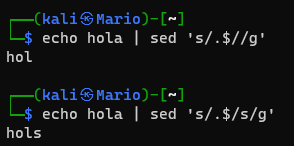
Eliminar filas con sed.
Podemos también eliminar filas con el comando sed, donde tenemos el siguiente texto:
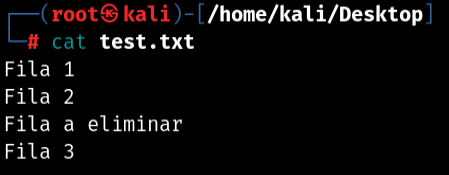
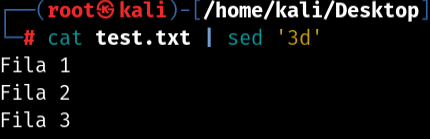
Y ahora podemos eliminar la tercera file con sed '3d':
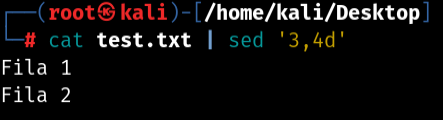
Aunque también podemos eliminar más de dos filas a la vez de la siguiente forma:
Añadir texto al final de cada línea.
También podemos añadir texto al final de cada línea de un archivo, por ejemplo vamos a suponer que al final de cada línea quiero añadir la frase 'El gato es feliz', pues lo haría de la siguiente manera:
cat texto.txt | sed -i 's/$/ El gato es feliz/' texto.txt
